







Welcome to the Capacitance Level Transmitter Calculation Table — a tool designed to help you quickly and accurately calculate key parameters for your level measurement installation.
This guide will walk you through how to use the table, explain what each field means, and show you how to read the results.
How to Use This Tool
🖱️ Adjusting Numbers
Every number input field comes with ▲ and ▼ buttons on the right side:
- Click ▲ to increase the value
- Click ▼ to decrease the value
- You can also type the number directly into the field
💡 Tip: Hover your mouse over any input field to make the adjustment buttons appear clearly.
📊 Dropdown Selections
The table includes several dropdown menus for selecting options like Display Type and Heat Sink. Simply click the dropdown and choose the option that matches your setup.
🔄 Automatic Calculation
All results update instantly as you change any value — no need to click a “Calculate” button.
Section 1: Sensor Total Length Calculation
This section calculates the total length of the sensor assembly, which includes the sensor head plus the probe that goes into the tank.
| Field | What It Means | How to Use |
|---|---|---|
| Sensor Type | Type of sensor used | Currently fixed to “Capacitance Level Transmitter” |
| Display Option | Whether your sensor has a digital display | Choose “No Display” or “Digital Display” |
| Heat Sink Option | Whether your sensor has a heat sink (for high-temperature applications) | Choose “No Heat Sink” or “With Heat Sink” |
| Total Sensor Length | Result — total length of the sensor assembly | This value is automatically calculated based on your selections |
📐 How It Works
The total sensor length is calculated as:
- No Display + No Heat Sink → 75.5mm + Tank Height
- No Display + With Heat Sink → 154.5mm + Tank Height
- Digital Display + No Heat Sink → 160mm + Tank Height
- Digital Display + With Heat Sink → 260mm + Tank Height
Why this matters: This tells you how much space the sensor will occupy from the top of the tank to the end of the probe.
Click here to select and calculate.
Section 2: Outer Tube Length Calculation
This section calculates the lengths of various outer tubes that protect the probe inside the tank.
📝 Important Notice
Before entering values, please note:
- Wall Thickness + Flange Thickness ≥ 12mm — If the sum is less than 12mm, the system will automatically correct it and notify you.
- If Wall Thickness + Flange Thickness = 12mm, the Length from Thread Bottom to Probe End equals the Total Range (Tank Inner Height).
Input Fields
| Field | What It Means | How to Use |
|---|---|---|
| Length from Thread Bottom to Probe End (Total Range) | The total measuring range of the sensor — typically equal to the inner height of the tank | Enter the height of your tank’s liquid level range |
| Length from Thread Top to Probe End | The length from the top of the thread to the end of the probe | This is automatically calculated (Total Range + 12mm) |
| Wall Thickness | Thickness of the tank wall at the mounting point | Enter the measured thickness in mm |
| Flange Thickness | Thickness of the mounting flange | Enter the measured thickness in mm |
| Heat Sink Tube Length | Length of the heat sink tube (if applicable) | Set automatically to 100mm when “With Heat Sink” is selected |
| Stainless Steel Tube Tolerance | Manufacturing tolerance for the stainless steel tube | Default is 0.2mm — adjust if needed |
🔢 Results
| Result Field | What It Shows |
|---|---|
| Outer Probe Tube Length | Length of the outer stainless steel tube |
| Plastic Tube Length | Length of the plastic insulation tube |
| Fiber Tube Length | Length of the fiber insulation tube |
Why this matters: These values help you confirm that the tubes will fit correctly inside your tank and reach the desired measuring range.
Click here to select and calculate.
Section 3: Inner Probe Calculation
This section calculates the internal probe dimensions, which are critical for accurate measurement performance.
Input Fields
| Field | What It Means | How to Use |
|---|---|---|
| Probe Tolerance | Manufacturing tolerance for the probe rods (±) | Default is ±0.1mm — adjust if your application requires different precision |
| Upper/Lower Probe Length | Length of the upper and lower probe sections | Enter the required length in mm |
🔢 Results
| Result Field | What It Shows |
|---|---|
| Middle Probe Length | Length of the middle (insulated) section of the probe |
| Effective Measuring Range | The actual usable measuring range of the probe |
Why this matters: These values determine the active sensing area of the probe. The middle probe length affects the capacitance reading, and the effective range tells you the maximum level you can measure.
Reading the Results
📊 All Results Are Displayed in Red/Bold
Throughout the table, all calculated results appear in bold blue text with the unit mm.
Here’s a quick reference:
| Result | What It Tells You |
|---|---|
| Total Sensor Length | How long the entire sensor assembly is |
| Outer Probe Tube Length | How long the protective outer tube should be |
| Plastic Tube Length | How long the plastic insulation tube should be |
| Fiber Tube Length | How long the fiber insulation tube should be |
| Middle Probe Length | The active sensing length inside the tank |
| Effective Measuring Range | The maximum level you can measure |
Image Reference
On the right side of the calculator, you’ll find two images:
📐 Image 1: Installation Drawing

🖼️ Image 2: Model Drawing

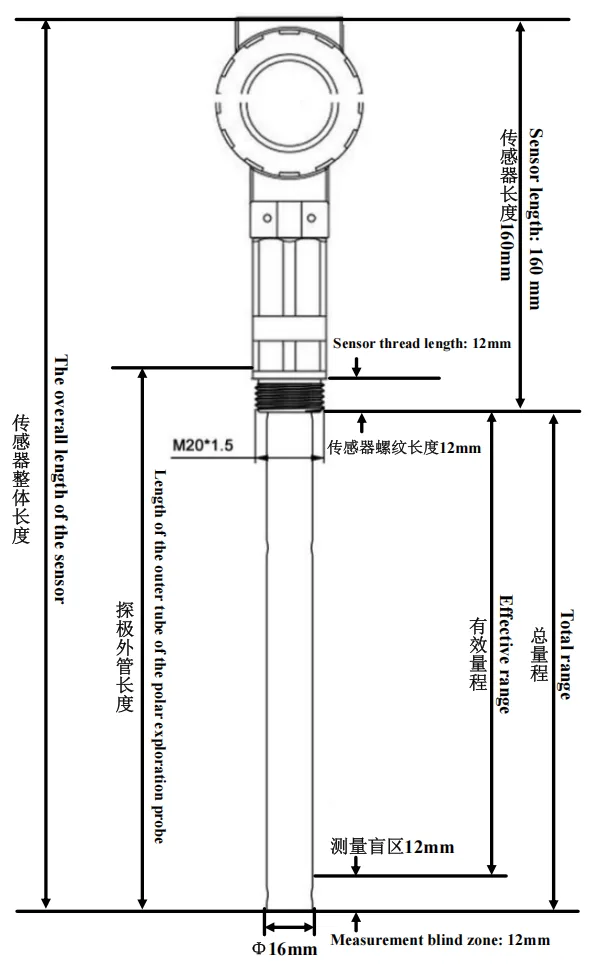

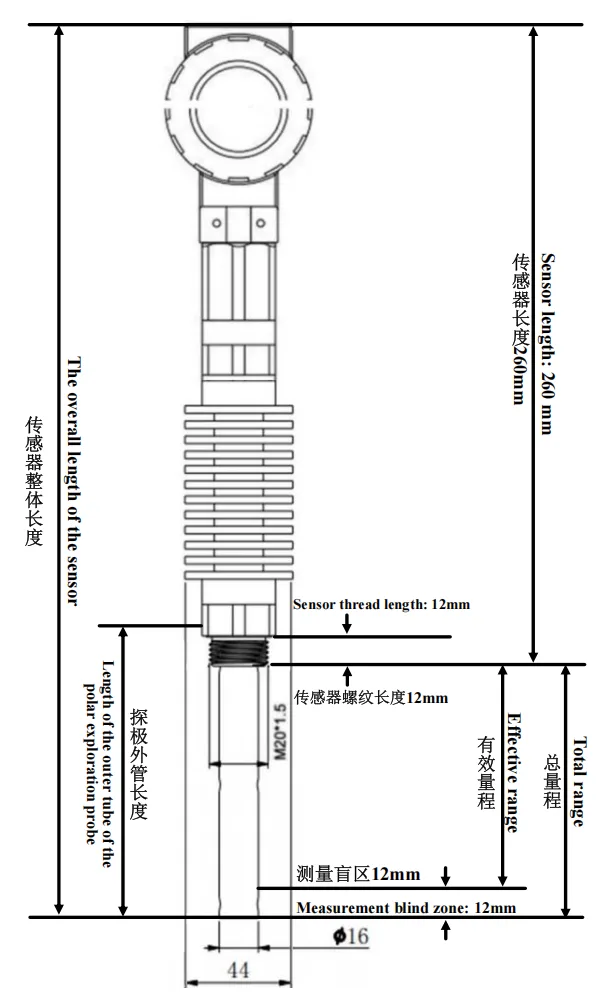
💡 Click on either image to enlarge it — helpful for checking dimensions and installation details.
Click here to select and calculate.
Tips & Best Practices
✅ Before You Start
- Have your tank dimensions ready (height, wall thickness)
- Know whether your sensor has a digital display or heat sink
- Have your flange thickness measured
📝 During Input
- Use the ▲ / ▼ buttons for quick value adjustments
- Type numbers directly if you need a specific value
- Watch for the automatic notice if Wall Thickness + Flange Thickness < 12mm
🔍 After Calculation
- Double-check that all entered values match your actual setup
- Save or print the results for your installation team
- Click on the model image to verify dimensions
⚠️ Common Mistakes to Avoid
| Mistake | Solution |
|---|---|
| Forgetting to add flange thickness | Always measure and enter the actual flange thickness |
| Entering wall thickness alone | The calculation requires both wall + flange thickness |
| Ignoring the tolerance fields | Manufacturing tolerances affect tube lengths — include them for accuracy |
| Assuming “Total Range” = tank height | Yes, for standard installations — but check your specific setup |
Need Help?
If you have questions about your specific installation:
- 📧 Contact our technical support team at sales@kacise.com
- 🌐 Visit our website at www.kcsensor.com for more resources


